
Are You Using Xero—or Simply Paying for It?
Many Australian small businesses use Xero to send invoices and prepare their BAS.
But Xero can do much more than basic bookkeeping.
When it is set up and used properly, Xero can help you:
- reduce manual data entry;
- keep your accounts up to date;
- improve your invoicing and debt collection;
- monitor cash flow;
- simplify payroll;
- track project profitability; and
- collaborate with your accountant or bookkeeper.
Xero includes tools for bank reconciliation, invoicing, payroll, reporting, expenses, mobile bookkeeping, app integrations and Australian compliance requirements. However, the features available to you may depend on your subscription plan.
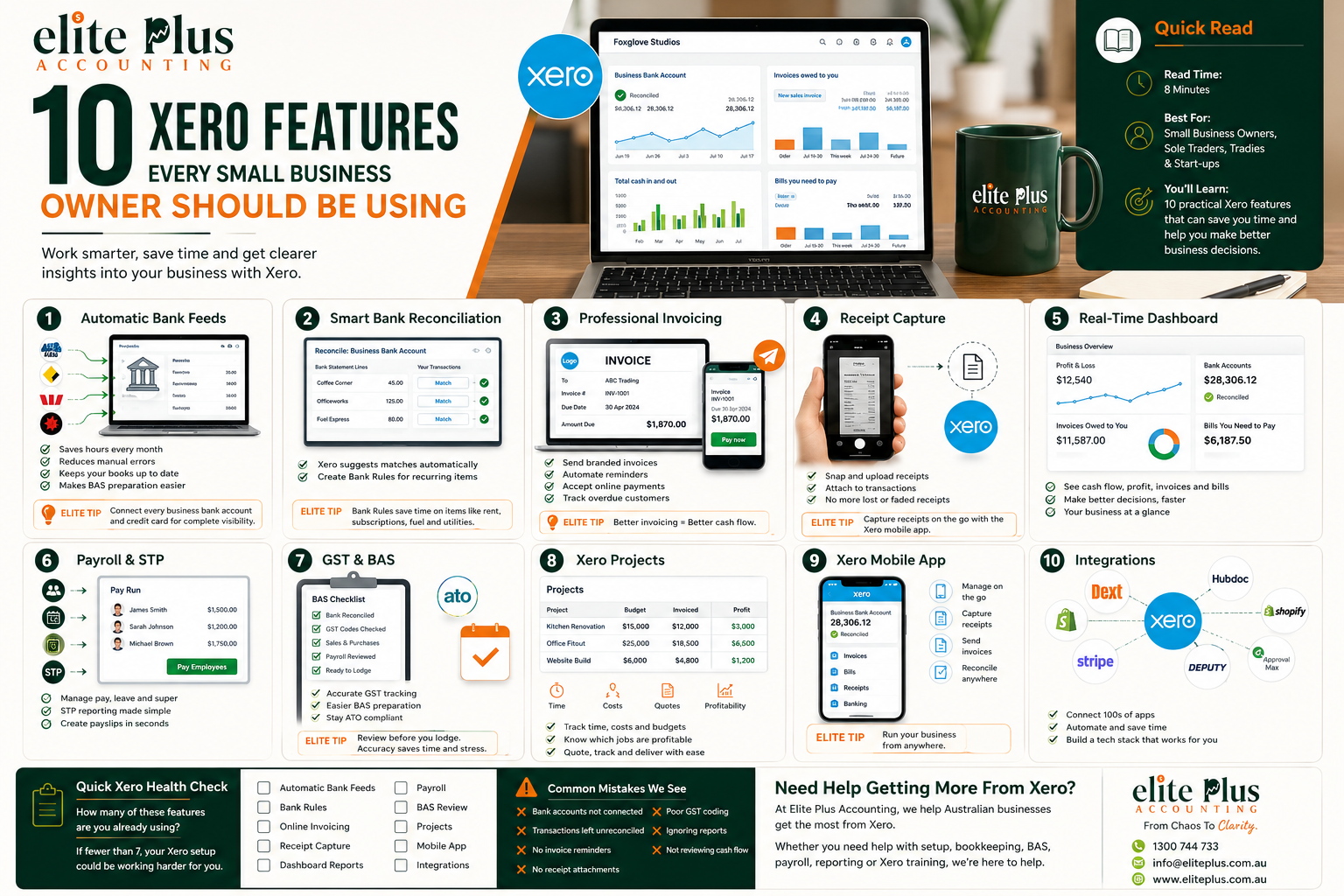
Here are 10 Xero features every small business owner should consider using.
1. Automatic Bank Feeds
Manually entering every bank transaction takes time and increases the risk of errors.
Xero bank feeds securely bring transactions from connected business bank accounts and credit cards into Xero. You can connect multiple accounts and, where an automatic feed is unavailable, upload transaction files manually.
Why this matters
With your bank transactions flowing into Xero regularly, you can:
- keep your bookkeeping current;
- reduce manual transaction entry;
- identify missing or duplicated transactions;
- monitor money coming in and going out; and
- prepare more accurate financial reports.
Elite Plus Tip: Connect every business bank account, credit card and payment platform used by the business. Leaving one account outside Xero can result in incomplete reports.
2. Bank Reconciliation and Bank Rules
A bank feed imports transactions—but those transactions must still be correctly matched and categorised.
Xero can suggest matches between bank transactions and existing invoices, bills or transfers. It also allows bank rules to be created for recurring transactions. Xero’s newer automation features can perform or suggest more of the reconciliation process for review.
Practical examples
You may create rules for:
- monthly software subscriptions;
- bank fees;
- regular rent payments;
- merchant fees;
- fuel purchases; or
- recurring customer deposits.
Bank rules should still be reviewed periodically. A poorly constructed rule can repeatedly code transactions to the wrong account or apply incorrect GST treatment.
Best practice
Reconcile your accounts regularly rather than waiting until BAS or tax time.
Key takeaway: A reconciled bank account gives you confidence that the figures in Xero are based on complete and current transactions.
3. Professional Invoicing and Automatic Reminders
Creating an invoice is only the first step. The real goal is getting paid.
Using Xero, businesses can create and send invoices, track whether invoices remain unpaid and add online payment options where supported. Mobile invoicing also allows an invoice to be issued soon after completing a job.
Features worth setting up
- branded invoice templates;
- payment terms;
- automatic invoice numbering;
- repeating invoices;
- online payment options;
- payment reminders; and
- statements for overdue customers.
Why it helps cash flow
Sending invoices promptly gives the customer more time to pay before your own bills become due. Automatic reminders can also reduce the time you spend personally following up overdue accounts.
4. Bills, Receipts and Expense Capture
Business owners often lose deductions because receipts are missing, faded or sitting in different email accounts.
Xero’s expense tools can help businesses manage spending, submit claims and store supporting documents. Mobile receipt capture allows users to photograph receipts and keep the image with the accounting record.
A better expense process
Instead of placing receipts in a drawer:
- Photograph or upload the receipt.
- Record the supplier, date, amount and business purpose.
- Check the GST treatment.
- Attach the document to the relevant transaction.
- Review and reconcile it promptly.
This creates a stronger audit trail and makes it easier to answer questions from your accountant, bookkeeper or the ATO.
Pro Tip: Do not rely only on the bank statement. A bank transaction confirms that money was spent, but it may not explain exactly what was purchased or why it was business-related.
5. The Xero Dashboard and Real-Time Reports
Your accounting software should do more than store historical transactions.
Xero’s accounting dashboard can display bank balances, outstanding invoices, bills and other financial information. It also provides real-time reports when the underlying bookkeeping is current and accurate.
Reports every business owner should review
At a minimum, review:
- Profit and Loss: Is the business actually profitable?
- Balance Sheet: What does the business own and owe?
- Aged Receivables: Which customers have not paid?
- Aged Payables: Which suppliers need to be paid?
- Cash Summary or cash-flow report: Where is cash coming from and going?
- Budget versus Actual: Is performance aligned with the plan?
Important reminder
Real-time reporting is only useful when transactions are correctly coded and reconciled.
Poor bookkeeping creates misleading reports—even when the software looks impressive.
Good software does not automatically create good numbers.
Correct setup, regular bookkeeping and meaningful review still matter.
6. Payroll, STP and Employee Self-Service
Australian employers have payroll, PAYG withholding, superannuation, leave and Single Touch Payroll obligations.
Xero Payroll can calculate employee pay, tax, superannuation and leave, while supporting STP reporting. Employees can use Xero Me to view payslips, submit leave requests and record timesheets from their phones.
Why employee self-service is valuable
It can reduce administration by allowing employees to:
- view their own payslips;
- check leave balances;
- submit leave requests;
- complete timesheets; and
- submit certain expense claims.
What still requires attention
Payroll software does not replace correct:
- employee classifications;
- pay rates;
- award interpretation;
- superannuation settings;
- leave setup; or
- payroll review.
Review every pay run before finalising and lodging it.
7. GST Tracking and BAS Preparation
Xero can track GST on transactions and assist with preparing BAS information. Cloud accounting software can also support Australian compliance tasks such as GST tracking, BAS preparation and STP reporting.
Before relying on the BAS figures, check:
- all bank accounts are reconciled;
- sales have been completely recorded;
- supplier bills and expenses are entered;
- GST-free and input-taxed transactions are coded correctly;
- private expenses are separated;
- asset purchases are reviewed;
- payroll accounts agree with payroll reports; and
- clearing accounts do not contain unexplained balances.
BAS Tip: Xero calculates based on how transactions have been entered. It cannot determine whether an incorrect GST code reflects the actual tax treatment.
For this reason, the BAS should be reviewed before lodgement.
8. Xero Projects and Job Profitability
A business can be busy and still lose money on individual jobs.
Xero Projects can track time, expenses, project budgets, invoices and job profitability. Tracked time and costs can feed into project invoices, while reports compare estimates against actual results.
This feature may be useful for:
- consultants;
- trades businesses;
- agencies;
- designers;
- engineers;
- builders;
- IT providers; and
- other project-based businesses.
Questions project tracking can help answer
- Which jobs are most profitable?
- Are quoted hours realistic?
- Are material costs increasing?
- Is too much time being written off?
- Has all billable work been invoiced?
- Is a project going over budget?
Revenue alone does not show whether a job was successful.
You need to compare revenue against the labour, materials and overheads required to deliver it.
9. The Xero Mobile App
Small business owners are rarely sitting at a desk all day.
A mobile accounting app can allow you to send invoices, capture receipts, reconcile transactions and review cash flow from a phone or tablet.
Useful mobile habits
Use the app to:
- photograph a receipt immediately;
- send an invoice after completing a job;
- check whether a customer has paid;
- reconcile simple transactions;
- monitor overdue invoices; and
- review key figures before a meeting.
Small actions completed regularly can prevent a large backlog from developing.
10. Xero Integrations and Automation
Your accounting system does not need to operate by itself.
Xero supports connected apps and integrations that can extend functions such as document capture, approvals, payroll, inventory, ecommerce, payments, forecasting and reporting.
Depending on your business, integrations may help connect Xero with:
- receipt and bill-capture software;
- expense approval systems;
- ecommerce platforms;
- point-of-sale systems;
- inventory management;
- time tracking;
- rostering;
- payroll tools;
- payment gateways;
- cash-flow forecasting; and
- management reporting.
Xero is also introducing more AI-supported functionality through JAX, including transaction reconciliation, bill and receipt capture, GST and BAS visibility, and plain-language questions based on current Xero data. Availability may vary by plan and the feature may still be in beta.
Do not add apps without a plan
Before connecting an app, ask:
- What problem will it solve?
- Who will use it?
- Will it replace an existing process?
- Will the data flow correctly into Xero?
- Who will review errors or exceptions?
- Does the benefit justify the monthly cost?
Automation should simplify the workflow—not create another system that nobody manages.
Bonus Feature: Invite Your Accountant or Bookkeeper
One major benefit of cloud accounting is that authorised users can work from the same current information.
This means your accountant or bookkeeper can review the file without waiting for backups, emailed spreadsheets or paper reports. Xero describes its software as connecting business owners with their bank, advisers and other business apps.
Use appropriate user permissions so each person only has access to the information they need.
How Many of These Features Are You Actually Using?
Using Xero effectively is not about activating every available feature.
It is about selecting the tools that:
- suit your business;
- reduce unnecessary administration;
- improve the accuracy of your records;
- provide better financial visibility; and
- help you make decisions earlier.
A simple, well-managed Xero file is more valuable than a complicated file full of unused apps, duplicated processes and unreconciled transactions.
Quick Xero Health Check
Ask yourself:
- Are all business accounts connected?
- Is the bank reconciled regularly?
- Are invoices sent promptly?
- Are automatic reminders active?
- Are receipts attached to transactions?
- Do I review reports every month?
- Is payroll reviewed before finalisation?
- Are GST and BAS figures checked?
- Do I know which projects are profitable?
- Are my connected apps genuinely saving time?
If several answers are no, you may not be receiving the full value from your Xero subscription.
Need Help Getting More From Xero?
At Elite Plus Accounting, we help Australian small businesses use Xero more effectively.
We can assist with:
- Xero setup and conversion;
- chart-of-accounts review;
- bank feeds and reconciliation;
- invoice and payment workflow setup;
- payroll setup and processing;
- BAS and GST reviews;
- bookkeeping;
- management reporting;
- app integrations; and
- Xero training for business owners and teams.
Stop Using Xero as a Digital Filing Cabinet
Use it as a tool to understand your business, improve your processes and make more confident decisions.
Elite Plus Accounting
From Chaos To Clarity.
📞 1300 744 733
📧 info@eliteplusaccounting.com.au
🌐 eliteplusaccounting.com.au
Disclaimer
This article contains general information only and does not take into account your individual objectives, financial circumstances, software requirements or business needs. Xero features, subscription plans and availability may change. Please obtain professional advice and confirm current functionality before making accounting, taxation or software decisions.
get in touch
Connect with Our Experts
Our dedicated team of accountants and bookkeepers is here to guide you toward the best financial solutions. Reach out today and speak with one of our experienced professionals to get started on the right path.


Recent Blogs
A common assumption among Australian business owners is: “They have an ABN and send me an invoice, so they are responsible for their own super.” Unfortunately, it is not always that simple. For super guarantee purposes, the ATO looks at the substance of the arrangement. Some independent contractors must still receive super where the contract is wholly […]
Read More
Working two jobs in Australia can affect how much tax is withheld from your pay. Learn how the $18,200 tax-free threshold works, when to claim it, and how claiming it from multiple employers could lead to an unexpected tax bill.
Read MoreDiscover 10 essential Xero features that help small business owners manage finances, save time, track expenses, improve accuracy, and make smarter business decisions with ease.
Read More